Healthcare Software
Hospital Management System (HMS) in India: Modules, Benefits and How to Choose
A hospital management system (HMS) is the software that runs a hospital's daily operations: patient registration, appointments, clinical records, beds, pharmacy, laboratory, billing and reporting in one connected system. For most Indian hospitals the real question is no longer whether to use one, but how to pick one that fits their workflows instead of forcing staff to work around it.
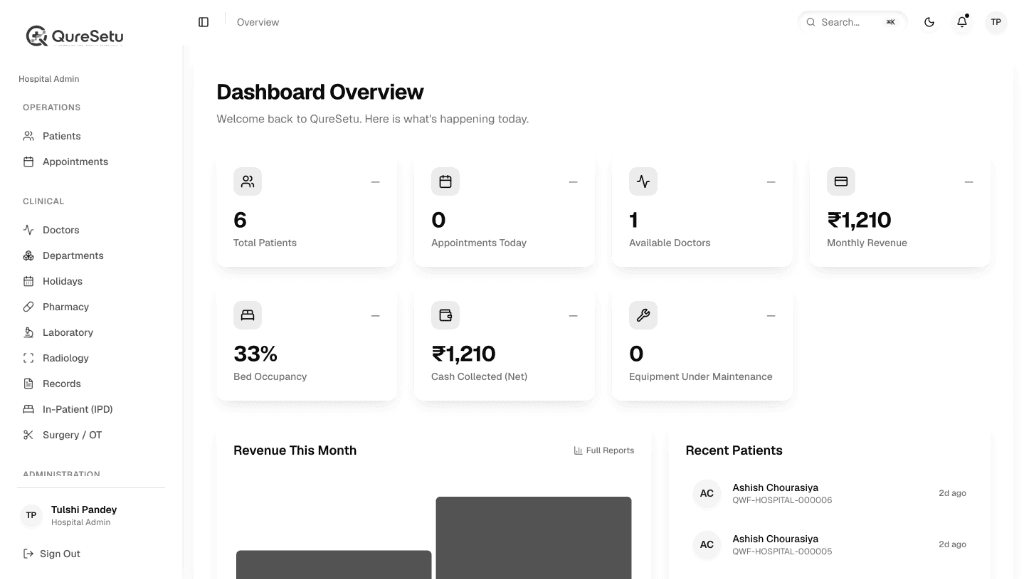
What a hospital management system actually does
An HMS replaces the registers, spreadsheets and disconnected tools that hospitals accumulate over the years. Instead of a receptionist, a doctor, a pharmacist and a billing clerk each holding part of the picture, everyone works from the same patient record.
The practical result is fewer manual errors, shorter queues, faster billing and, for management, one dashboard that shows how the hospital is performing today rather than at month end.
Core modules every hospital should expect
- OPD and appointments: registration, doctor schedules, queue and token management, reminders.
- IPD and bed management: admissions, ward and bed allocation, nursing notes, discharge summaries.
- Pharmacy: stock, batch and expiry tracking, dispensing linked to prescriptions.
- Laboratory and radiology: test orders, sample tracking, result entry and report delivery.
- Surgery and OT: scheduling, theatre allocation and procedure records.
- Billing and insurance: itemised invoices, package pricing, TPA and insurance workflows, cash reconciliation.
- Reports and analytics: occupancy, revenue by department, doctor-wise activity.
- Roles and permissions: each staff role sees only what it needs.
Our own platform, QureSetu, covers these areas in a single system. You can read how we approached the design in the QureSetu case study.
How to choose the right HMS
1. Start from your workflows, not a feature list
Walk through a normal day: a walk-in patient, an emergency admission, a discharge with insurance. Ask each vendor to demonstrate exactly that flow. A long module list is less useful than a smooth OPD-to-billing path.
2. Check how it handles your scale
A 20-bed hospital and a multi-branch group have different needs. Ask about multi-branch support, concurrent users at peak hours, and what happens when the internet connection drops.
3. Look at compliance and data protection
Ask about role-based access, audit trails, encrypted storage and backups. If you plan to use ABHA or other national digital health services, check readiness for ABDM. We cover that in our ABDM integration guide.
4. Plan for training and support
Most failed rollouts are adoption failures, not software failures. Find out who trains your staff, how long go-live takes, and what support looks like after launch.
5. Understand the total cost
Licence or subscription is only one part. Setup, data migration, training, customisation and support all matter. See our breakdown in hospital management software cost in India.
Common mistakes to avoid
- Buying on price alone and discovering later that billing or insurance workflows are missing.
- Skipping a pilot. Run one department first, then expand.
- Ignoring data migration. Patient history needs a clear import plan.
- Leaving staff out of the decision. The people using the system daily should test it.
- Choosing a closed system that cannot integrate with labs, devices or government platforms.
Off-the-shelf HMS or a custom-built one?
A ready-made HMS gets you running quickly. A custom or heavily tailored system makes sense when your workflows are unusual, you run several branches with different rules, or you want to own the product. We compare the two approaches in custom software vs off-the-shelf.
Frequently asked questions
What is a hospital management system?+
A hospital management system (HMS) is software that manages a hospital's operations in one place, including patient registration, appointments, clinical records, beds, pharmacy, laboratory, billing and reporting.
Which modules does a hospital need first?+
Most hospitals start with OPD and appointments, billing, and pharmacy, then add IPD and bed management, laboratory, radiology and surgery modules as they grow.
Can a small clinic use a hospital management system?+
Yes, but a lighter clinic management system is often a better fit. It covers appointments, consultations, prescriptions and billing without the inpatient modules.
How long does an HMS rollout take?+
It depends on the size of the hospital, how much data must be migrated and how much customisation is needed. A phased rollout, one department at a time, is usually safer than switching everything at once.